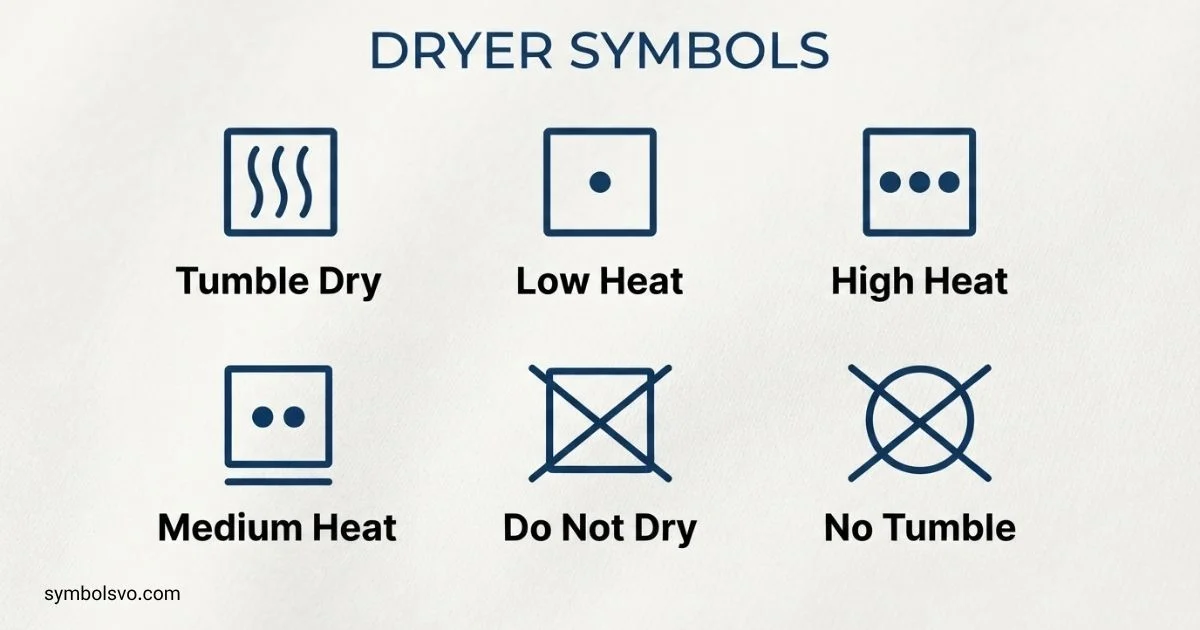
Have you ever looked at a dryer label and wondered what all those strange symbols mean? I know how confusing they can feel, especially when you simply want to dry your clothes without damaging them.
When you understand dryer symbols, laundry becomes much easier. You can quickly tell which heat setting, drying cycle, or care method is safe for each fabric instead of guessing.
In this guide, I’ll walk you through the most common dryer symbols in a simple way. You’ll learn what they mean, how to use them, and how these small symbols can help you care for your clothes with confidence.
Dryer Symbols Meaning
Dryer symbols can refer to two different things: care symbols on clothing labels and icons on the dryer’s control panel.
The most important clothing-label drying symbol is a square containing a circle. It means the garment can be tumble-dried. If the symbol is crossed out, the item should not be tumble-dried. Bosch describes the square-with-circle as the general tumble-dry symbol and confirms that a crossed-out version means do not tumble-dry.
Here is a quick reference:
| Dryer symbol | Meaning |
| □ with a circle | Tumble dry |
| □ with a crossed-out circle | Do not tumble dry |
| □ with one dot in the circle | Tumble dry at low heat |
| □ with two dots in the circle | Tumble dry at normal or medium heat |
| □ with three dots in the circle | Tumble dry at high heat |
| □ with two horizontal lines underneath | Gentle or very gentle drying, depending on the care-symbol system |
| Plain □ | Air drying rather than tumble drying |
The exact symbol appearance may vary slightly by labeling system, but the basic square-and-circle design is widely used for tumble drying.
Dots generally communicate heat level. One dot indicates lower heat, two indicate a higher temperature, and three indicate the highest temperature allowed by that care-label system. Bosch lists one, two, and three dots as low, medium, and high drying temperatures respectively.
Always follow the garment label rather than choosing a hotter setting simply because the dryer offers it.
Dryer Symbols LG
LG dryer symbols and indicator lights vary by model, so the exact icons on one LG dryer may not appear on another. LG’s support documentation shows that some models use indicators such as Clean Filter, Dry, Cool, Flow Sense, Control Lock, High, Medium, Normal, Low, and Damp.
Common LG dryer indicators can include:
| LG indicator | What it generally tells you |
| Clean Filter | The lint filter needs attention |
| Dry | Drying portion of the cycle |
| Cool | Cooling portion of the cycle |
| Flow Sense | Airflow restriction or venting information |
| Control Lock | Controls are locked |
| High | High-temperature setting |
| Medium | Medium-temperature setting |
| Low | Low-temperature setting |
| Damp | Clothing still contains moisture |
The meaning of an icon should always be checked against the manual for your exact model. An icon that looks similar across two LG dryers may have a different function.
LG also uses blinking indicator combinations for troubleshooting on some models. Its support guide explains that some dryers use blinking LEDs instead of displaying conventional alphanumeric error codes.
If your LG dryer is showing a warning rather than a normal cycle indicator, identify the exact model before deciding what the symbol means.
Dryer Symbols Samsung
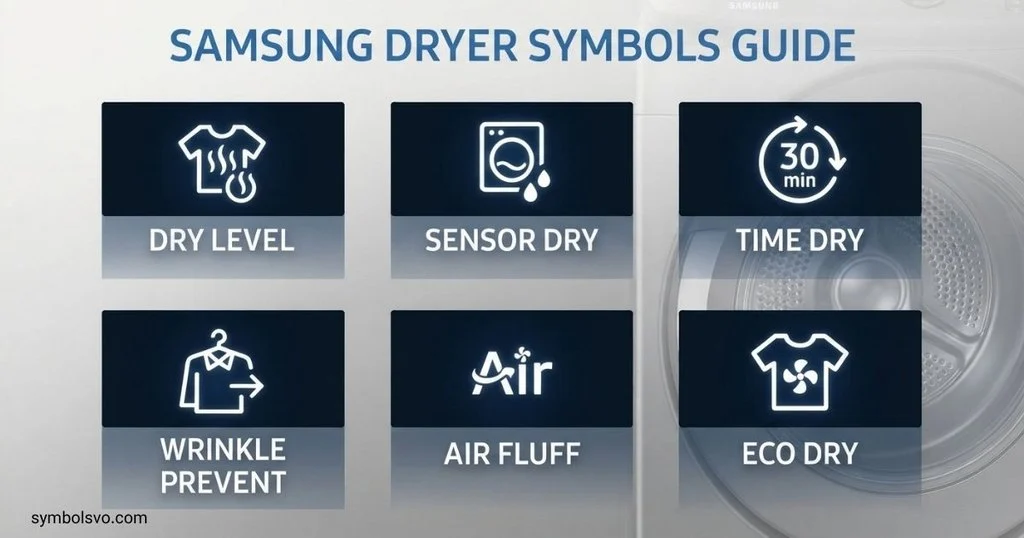
Samsung dryer icons are model-dependent. Samsung states that the appearance and availability of icons can vary between models, so the user manual is the best source for model-specific information.
Common Samsung dryer icons include:
- Sensor Dry — A sensor-based drying cycle is running.
- Child Lock — Controls are locked.
- Delay Start — A delayed start has been selected.
- Filter Reminder — A reminder to check or clean the lint filter.
- Time Remaining — Indicates remaining cycle time.
- Steam — A steam-related option is active on models that support it.
- Smart Control — Remote-control functionality is available.
- Wi-Fi — Indicates a network connection on compatible models.
- Vent Check — Indicates that the exhaust vent may need attention on supported models.
Samsung explains that its dryer icons can indicate active features, cycle progress, reminders, or other appliance information.
A particularly useful distinction is between a normal status icon and an error or information code. A lit icon does not necessarily mean that something is wrong.
If your Samsung dryer shows an unexpected icon, check the model-specific manual before troubleshooting. Samsung also provides separate guidance for information and error codes.
Bosch Dryer Symbols
Bosch uses standard laundry-care symbols for garments, while Bosch dryer control panels can have model-specific program and option icons.
For clothing labels, the basic symbols are easy to recognize:
| Symbol design | Meaning |
| Square + circle | Suitable for tumble drying |
| Square + circle + one dot | Low-temperature drying |
| Square + circle + two dots | Normal-temperature drying |
| Square + crossed-out circle | Do not tumble dry |
| Plain square | Air drying |
Bosch explains that the dryer symbol on a laundry label is always based around a square, with a circle inside when tumble drying is intended.
A crossed-out tumble-dry symbol means the garment should not be placed in a tumble dryer. A plain square indicates air drying rather than machine drying.
Bosch also distinguishes between gentle drying options. For example, one line underneath the tumble-dry symbol indicates a gentler cycle, while two lines indicate an extra-gentle treatment in the care-symbol system.
Do not confuse these garment-care symbols with the program icons on a Bosch machine. The care label tells you what the fabric can tolerate; the dryer panel tells you what the appliance is programmed to do.
Tumble Dryer Symbols Beko
Beko uses the same general clothing-care symbol system for tumble drying. Its guidance lists symbols for tumble drying, temperature levels, air drying, line drying, drying in shade, drying flat, and other care methods.
Some important Beko-related laundry symbols are:
- Tumble dry — The garment can be dried in a tumble dryer.
- Low heat — Use a lower-temperature drying program.
- Medium heat — A medium drying temperature is allowed.
- High heat — A higher drying temperature is allowed.
- Do not tumble dry — Do not place the garment in a tumble dryer.
- No heat — Dry without applying normal heated drying.
- Dry flat — Place the garment flat while drying.
- Hang dry — Hang the garment to dry.
- Dry in shade — Keep the garment out of direct sunlight while drying.
Beko recommends checking the garment care label and sorting clothes according to their drying requirements.
This matters because a Beko dryer may offer several programs, but the clothing label determines which treatment is suitable for a particular garment.
Washer Dryer Symbols
A washer dryer combines washing and drying functions in one appliance, so its control panel can contain symbols for both parts of the process.
Common washer dryer icons may represent:
- Washing
- Rinsing
- Spinning
- Drying
- Drying temperature
- Drying level
- Extra drying
- Iron-dry
- Cupboard-dry
- Delicate drying
- Delay start
- Child lock
- Filter or maintenance reminders
The symbols are not universal across every manufacturer.
A wash symbol should not be confused with a drying symbol. On clothing labels, washing symbols are generally represented by a washtub, while tumble-drying symbols use a square containing a circle.
This distinction is especially useful when reading a garment label:
Washtub = washing instructions
Square with circle = tumble-drying instructions
Square without circle = air-drying instructions
Bosch likewise explains that laundry labels contain different symbols for washing and drying, with the square used for drying instructions.
Dryer Symbols on Clothes
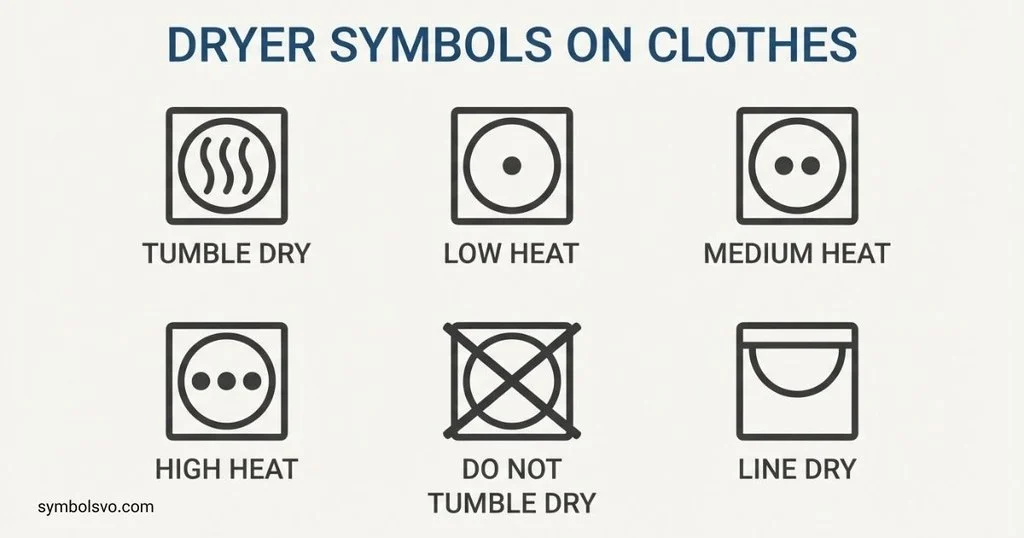
Dryer symbols on clothes tell you how the garment should be dried after washing.
The most recognizable symbol is:
□◯ — Tumble dry
A cross through the symbol means:
Do not tumble dry
Temperature can then be shown through dots inside the circle.
One dot
□ with one dot inside the circle
This indicates low-temperature tumble drying. Bosch gives one-dot drying as low heat, up to approximately 60°C in its guidance.
Two dots
□ with two dots inside the circle
This indicates normal or medium-temperature tumble drying. Bosch describes two dots as warm or medium heat, up to approximately 80°C in its care-symbol guidance.
Three dots
□ with three dots inside the circle
This indicates high-temperature tumble drying.
Crossed-out symbol
□◯ with an X through it
Do not tumble dry the garment.
If you see this symbol, use an alternative drying method recommended by the label.
Lines under the symbol
Lines underneath the tumble-dry symbol indicate a gentler treatment. Bosch identifies one line with permanent-press/gentle drying and two lines with extra-gentle drying.
The safest habit is simple: read the entire care label before putting delicate clothing in the dryer.
Laundry Dryer Symbols
Laundry dryer symbols cover more than just “dryer” and “do not dryer.”
A clothing label can give instructions about the drying method, heat, and level of care required.
| Care instruction | What to do |
| Tumble dry | Place the item in a suitable dryer |
| Low heat | Select a low-temperature program |
| Medium heat | Use a moderate temperature |
| High heat | A higher temperature is permitted |
| Do not tumble dry | Use another drying method |
| Dry flat | Lay the garment flat |
| Hang dry | Hang the garment while it dries |
| Dry in shade | Dry away from direct sunlight |
| Drip dry | Allow water to drip away while drying |
Beko’s care-symbol guide includes tumble drying, temperature variations, no-heat drying, drip drying, shade drying, hanging, and flat drying among its drying instructions.
One useful rule is to separate what the garment permits from what your machine offers. Your dryer may have a high-heat program, but that does not mean every garment can safely use it.
Lg Washer Dryer Symbols Meaning
LG washer dryer symbols can represent washing, rinsing, spinning, drying, temperature, options, and maintenance information. Their exact appearance varies by model.
For LG drying functions, you may encounter indicators related to:
- Drying
- Cooling
- Dampness
- Heat level
- Normal drying
- Low drying
- Control Lock
- Filter cleaning
- Airflow or venting
LG’s support information specifically identifies indicators such as Dry, Cool, Damp, High, Medium, Normal, Low, Clean Filter, Flow Sense, and Control Lock on applicable dryer models.
If you own an LG washer dryer rather than a standalone dryer, do not assume that every LG dryer icon applies to your appliance. Combination machines can use a different interface.
The model number is the best way to find the correct LG symbol guide.
Whirlpool Dryer Symbols Meaning
Whirlpool dryer symbols vary according to the dryer model, cycle selection, and market. The control panel may contain icons for drying stages, temperature, options, remaining time, and maintenance reminders.
Common categories can include:
- Drying level
- Temperature
- Timed drying
- Wrinkle prevention
- Delicate settings
- Air drying
- End-of-cycle indicators
- Filter reminders
- Control or lock indicators
A Whirlpool dryer icon should therefore be interpreted from the owner’s manual for the specific model rather than from a generic symbol list.
This is especially important when an icon appears alongside a flashing light or warning. A normal program indicator and a fault indicator can look very different depending on the machine.
For clothing labels, however, the standard tumble-dry symbol remains the useful reference:
□◯ = Tumble dry
□◯ crossed out = Do not tumble dry
The garment-care symbol applies to the clothing itself, regardless of whether you use a Whirlpool, LG, Samsung, Bosch, Beko, or another compatible dryer.
Whirlpool Dryer Symbols
Whirlpool dryer panels can include a mixture of cycle symbols, option indicators, and status lights. The exact selection depends on the model.
A useful way to read a Whirlpool dryer panel is to separate the symbols into three groups.
Cycle symbols
These identify the selected drying program, such as a normal, delicate, timed, or specialty cycle.
Option symbols
These modify the selected program. Depending on the model, they can include temperature, dryness level, wrinkle-control, or other options.
Status and warning symbols
These tell you what the dryer is doing or whether you need to take action.
If an unfamiliar Whirlpool icon appears, look for the model number on the appliance and use the matching owner’s manual. This is more reliable than assuming a symbol has the same meaning across every Whirlpool dryer.
Cheat Sheet lg Washer Dryer Symbols Meaning
A quick LG washer dryer cheat sheet can help you separate the most common functions.
| Symbol or label type | General meaning |
| Dry | Drying stage or drying function |
| Cool | Cooling stage after heated drying |
| Damp | Clothes still contain moisture |
| High | High heat |
| Medium | Medium heat |
| Low | Low heat |
| Normal | Standard drying level or cycle setting |
| Clean Filter | Check or clean the lint filter |
| Flow Sense | Airflow/venting warning or monitoring |
| Control Lock | Controls are locked |
These are general descriptions, not a universal LG symbol dictionary. LG confirms that indicator combinations and available features can differ by model.
For a precise answer, compare the icon on your appliance with the manual for that exact model. This is particularly important if the symbol is flashing.
A good quick rule is:
Normal icon = usually a setting or cycle status
Flashing or unexpected icon = check the manual for a warning or error
Dryer Symbols on Tags
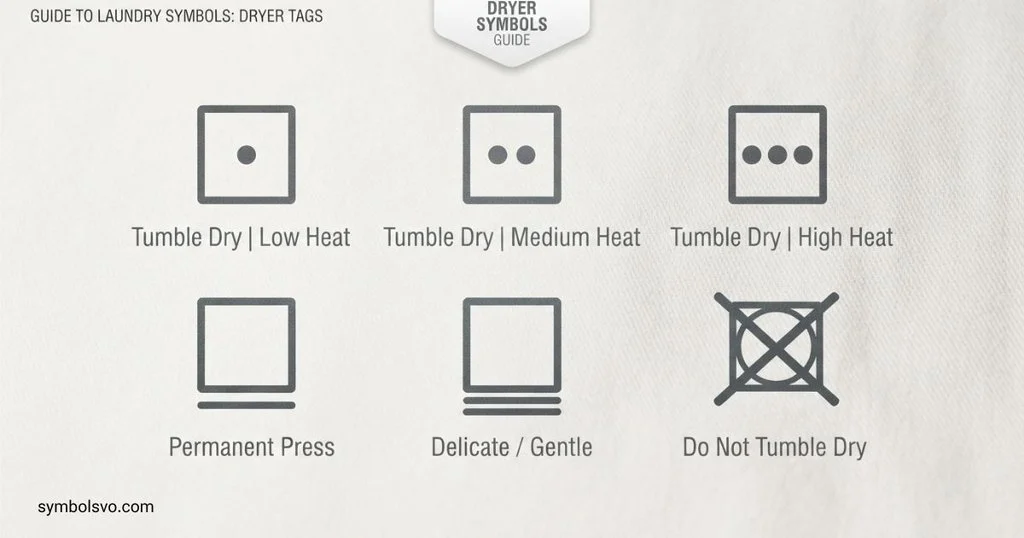
Dryer symbols on tags are among the most useful laundry symbols because they tell you how the manufacturer expects the garment to be dried.
Look for the square symbol.
A square with a circle means the item is suitable for tumble drying. A crossed-out version means it should not be tumble-dried. Bosch and other appliance-care resources use this same basic distinction.
Here is a simple tag reference:
| Tag symbol | Meaning | Dryer action |
| □◯ | Tumble dry | Dryer is allowed |
| □◯ with 1 dot | Low heat | Choose low heat |
| □◯ with 2 dots | Medium/normal heat | Choose moderate heat |
| □◯ with 3 dots | High heat | Higher heat is allowed |
| □◯ with X | Do not tumble dry | Do not use a tumble dryer |
| □ | Air dry | Hang, lay flat, or use another air-drying method according to the rest of the label |
| □ with lines | Air-drying method | Follow the indicated line, drip, flat, or shade instruction |
Do not confuse the square with a circle with the plain square. The circle is what identifies machine tumble drying.
Also remember that a dryer-safe label does not necessarily mean “use any cycle.” Heat level and gentle-drying marks still matter.
If a garment has a do-not-tumble-dry symbol, follow that instruction even if the fabric seems sturdy. Some garments contain finishes, coatings, elastic, adhesives, prints, or construction details that can be damaged by tumble drying.
Frequently Asked Questions
What is the symbol for tumble drying?
The standard tumble-drying symbol is a square with a circle inside it: □◯. A crossed-out version means the garment should not be tumble-dried.
What do the dots mean on a dryer symbol?
Dots indicate the permitted drying temperature. One dot generally means low heat, two dots indicate a higher or normal temperature, and three dots indicate high heat.
What does a square with a circle and a cross mean?
It means do not tumble dry. The garment should be dried using another method specified by its care label.
Why does my Samsung dryer show a symbol?
Samsung dryers use icons to show active settings, cycle progress, reminders, or other information. The exact icons differ by model, so the appliance manual is the best source for a specific symbol.
Are dryer symbols on clothes the same as dryer machine icons?
No. Clothing-label symbols tell you how the garment should be treated. Machine icons tell you about the dryer’s selected program, feature, status, or warning. They serve different purposes.
Conclusion
Dryer symbols make laundry care much easier once you know the basic shapes. The square with a circle means tumble drying, dots indicate heat levels, and a crossed-out tumble-dry symbol means the garment should stay out of the dryer.
The symbols on LG, Samsung, Bosch, Beko, and Whirlpool appliances can be different because manufacturers and models use their own control-panel icons. For brand-specific warnings and settings, always use the manual for the exact appliance. Samsung, for example, specifically warns that icon availability and appearance vary between models.
The most useful habit is to check the clothing tag before choosing a drying cycle. Match the permitted drying method and temperature to the garment, then select the closest suitable program on your machine. This simple step can help reduce shrinkage, fading, stretching, and fabric damage.

I’m Daniel Brooks, a content creator and symbol enthusiast dedicated to researching the fascinating world of signs and symbols. I enjoy discovering the hidden meanings behind famous icons, emojis, historical emblems, and cultural symbols. Through my writing, I aim to provide trustworthy, well-researched, and reader-friendly information that helps people learn something new with every visit.
Books:
- The Complete Guide to World Symbols
- The Power of Universal Signs
 Mason Ellington
 Grace Whitmore